


Photo Video Maker - InSlide
4.72.15K Reviews
App Specs
- Version
- 2.4.2.1
- Updated On
- License
- Free
- Downloads
- 10,000,000+
- Developer
- Daily AI Studio
- Categories
- Video Players & Editors
- Platform
- Android, iOS
Screenshots
 Analysis by AppCompare
I tend to judge a slideshow maker by a simple question: can I turn a handful of photos into something worth sharing without spending longer learning the editor than making the video? Photo Video Maker - InSlide is aimed squarely at that quick, visual job. It’s a free video-making app from Daily AI Studio, and its focus is arranging photos into music-backed slideshows rather than replacing a full video-editing suite. That distinction matters: it suits casual projects, but it may not be the tool I’d choose for precise, layered editing.
Choosing the right kind of editor
Before installing any app in this part of the video-creation category, I’d decide what the finished clip needs to do. If the goal is a short birthday montage, a recap of a day out, or a simple sequence for social sharing, a photo-first workflow can save time. If I need to shape a longer story around recorded footage, tune audio carefully, or control a detailed timeline, a conventional video editor is usually a better starting point.
That’s the choice I see with InSlide: it puts slideshow creation ahead of broad editing. Its 4.8 average across around 152,000 ratings and more than 10 million installs suggest that this kind of straightforward tool has found a large audience. Those figures don’t tell me whether it will suit every workflow, though; the useful question is whether its photo-led approach matches yours.
First Impressions
When I first opened Photo Video Maker - InSlide, I was greeted with a sleek and user-friendly interface. It's one of those apps where you don’t need a Ph.D. in tech to figure out what to do next. The design is clean, with intuitive icons that guide you through the process of creating your slideshow masterpiece.
Right off the bat, I noticed that it only takes a few taps to start creating. You can select photos from your gallery, and the app does a fantastic job at organizing them. I found myself quickly selecting a bunch of my favorite snaps from my last vacation. It’s almost too easy!
Features That Stand Out
Okay, let’s talk features. This app is packed with them, and yet, it doesn’t feel overwhelming. Here’s a quick breakdown:
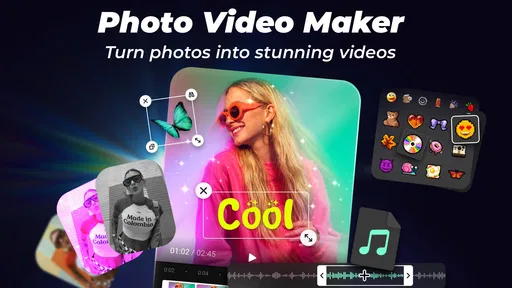
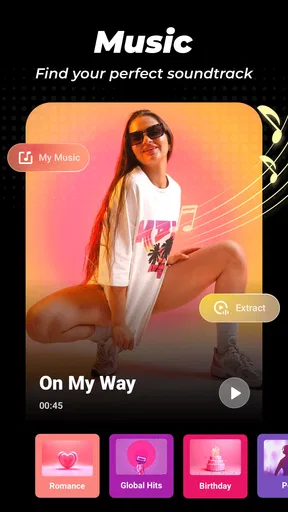
- Music Integration: You can add your favorite tunes directly from your library or choose from InSlide’s collection. The music syncing is seamless, making your slideshow feel like a professional production.
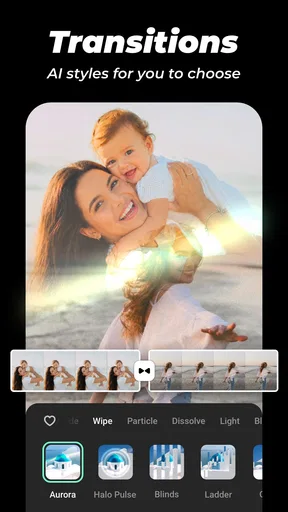
- Transition Effects: With a plethora of transition effects, you can add that extra pizzazz to your slideshow. I particularly loved the fade and zoom effects, which add a dynamic touch without being over the top.
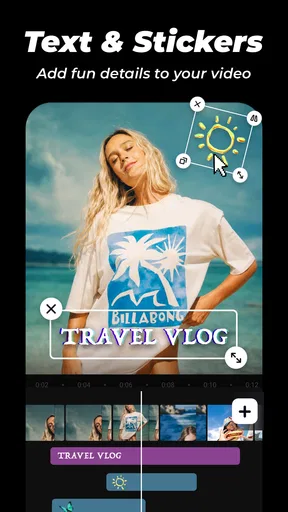
- Customizable Text: Want to add captions? No problem. The text feature lets you add and customize text in various fonts and colors. It’s perfect for adding those little personal notes or funny comments.
Plus, the app allows you to preview your slideshow before saving, so you can tweak things until it’s just right. I spent quite a bit of time playing around with different effects, and it was genuinely fun.
Worth Reading Before You Choose

EA SPORTS FC Mobile 26 Is a Bigger Football Game, but It Takes Time

Flipboard Shows What News Apps Must Do Beyond the Feed

Switching to Android Auto Means Rethinking Your Driving Routine

Google Calendar Makes a Crowded Week Easier to Manage

Ludo King Makes the Most of the Minutes Between Plans

Baby Panda World Brings Quick Play to Modern Phones, but Its Game Library Feels Busy
A practical workflow for everyday clips
For a family gathering or a weekend trip, I’d start by choosing a small set of photos that already tell a clear story: arrival, a few memorable moments, then a closing image. Selecting every decent shot can make a short montage feel repetitive, so being selective is often more useful than adding another transition. I’d arrange the images in the order I want people to remember the day, then preview the sequence before polishing it.
Music and captions work best when they support the photos rather than compete with them. I’d keep text brief—names, a place, or a quick in-joke—and check that it stays readable over each image. For music, I’d listen to the entire preview rather than judging only the opening; a track that starts well can feel mismatched by the final photos. These small checks help a simple slideshow feel intentional without turning the process into a long editing session.
One useful trade-off is that a slideshow’s pace depends on both the number of images and the music choice. If a clip feels rushed, trimming the photo selection may be more effective than adding effects. If it drags, a tighter sequence can keep attention better than layering on more visual changes. InSlide’s preview makes this kind of decision easier to make before saving.
Performance and Usability
Let’s get into the nitty-gritty of performance. I used the app on both my Android phone and my friend’s iPhone, and it worked smoothly across both platforms. There were no annoying crashes or lag, which is a big win in my book.
The app doesn’t hog your phone’s resources either. It’s a lightweight app, which means it doesn’t slow down your device or drain the battery. I was able to create multiple slideshows without any hiccups, and exporting them was a breeze.
Sharing is another area where Photo Video Maker - InSlide shines. Once your slideshow is ready, you can instantly share it on social media or send it directly to friends. It’s all about quick and easy sharing, which is exactly what you want when you’ve just created something you’re proud of.
Where alternatives may fit better
InSlide makes the most sense when photos are the main material. Compared with a general-purpose editor, its appeal is the direct route from gallery selection to a finished montage, with music, transitions, and text in the same creative flow. I’d reach for that when I want a quick recap rather than a carefully assembled film.
On the other hand, someone editing a video interview, a tutorial, or a project built from many video clips may prefer a timeline-focused editor. Those tools are better suited to arranging footage precisely, refining multiple audio elements, and making detailed changes across a longer sequence. A dedicated photo editor may also be the better first step if the images themselves need substantial correction: InSlide’s slideshow approach doesn’t replace that work.
There’s also a difference between making something easy to share and making it suitable for every destination. Before building a project around a particular social platform, I’d check the preview and saved result on the phone, then confirm that the composition and text look right where I plan to post it. That final check is sensible with any app, especially when a crop or display shape could affect how photos appear.
Room for Improvement?
No app is perfect, right? While InSlide ticks most of the boxes, there are a couple of areas where it could improve. For instance, I’d love to see more options for photo editing within the app itself. Although you can use external apps to edit your photos beforehand, having built-in editing tools would be super convenient.
Another point is the watermark on the free version. While it’s understandable, given that most apps do this, having an option to remove it without subscribing would be a nice touch.
Cost, compatibility, and the effort of switching
The app is free to install, with in-app purchases listed from $1.49 to $23.99 per item. I’d try the basic workflow before paying for anything: choose a representative set of photos, add a track and a short caption, then see whether the result meets your needs. That test tells you more than browsing editing options in the abstract. If the watermark is a deal-breaker, account for it before investing time in a large project.
It’s rated for Everyone, and the current version is 2.1.2.4. It requires Android 8.0 or later, which is worth checking before downloading on an older phone. The app was released on March 10, 2023; for a practical decision today, I’d focus more on whether it installs and runs comfortably on your own device than on its release date.
Switching from another editor is usually less about moving a whole project and more about rebuilding a sequence. Keep your chosen photos together and note their intended order before starting; that makes it easier to recreate the montage if you decide another app gives you better control. For one-off personal clips, the effort is small. For a recurring workflow with a carefully tuned style, compare a sample project in each editor before committing to a change.
Who will get the most from it?
I’d recommend InSlide to someone who wants an uncomplicated way to make a photo montage for friends, family, or social sharing and doesn’t want to learn a complex editing interface first. It’s especially practical when the photos are already selected and the goal is to add a soundtrack, a few transitions, and simple captions. The age rating of Everyone also makes it broadly accessible, though adults should still make their own choices about what images and music to use and share.
I’d skip it if my main task were detailed video production, extensive photo retouching, or exact control over a long edit. I’d also look elsewhere if I need a polished result without a watermark and don’t want to consider an in-app purchase. In those cases, a timeline-based video editor or a dedicated image-editing app is a more suitable category of tool, even if it takes longer to learn.
Final Thoughts
All in all, Photo Video Maker - InSlide is a fantastic tool for anyone looking to create stunning photo slideshows. Whether you’re a casual user wanting to jazz up your vacation pics or a social media enthusiast aiming to impress your followers, InSlide delivers.
It’s easy to use, packed with features, and performs like a champ. If you’re on the lookout for a solid slideshow maker, this one is definitely worth a try. Download it, play around, and let your creativity shine. Trust me, you’ll love it!
My recommendation
I’d try it when speed and a photo-led result matter more than fine-grained control. Start with a short, well-ordered set of images, check the music and captions in the preview, and make sure the free version’s watermark works for how you intend to share the clip. That simple trial should tell you whether its direct approach feels like a help or a limitation.
For casual memories and quick shareable montages, it earns a place on my shortlist. For projects where every cut, audio level, and image adjustment needs deliberate control, I’d choose a more specialized editor instead. The best reason to install InSlide is not that it replaces every tool, but that it can make one common task—turning photos into a short video—feel approachable.
Pros
- Easy-to-use interface for quick editing.
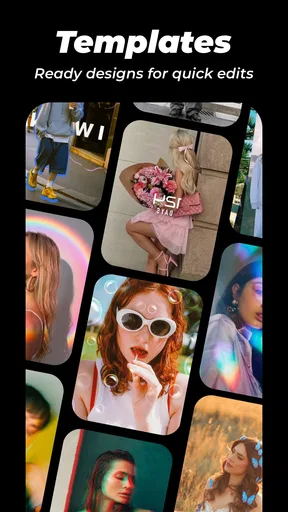
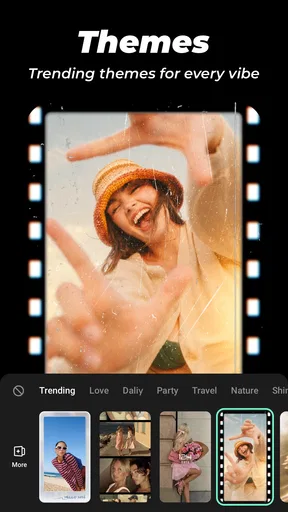
- Wide variety of templates and themes.
- Supports multiple media formats.
- Includes music library for background tracks.
- Fast export and sharing options.
Cons
- Limited advanced editing tools.
- Ads can be disruptive during use.
- Some features require in-app purchases.
- Occasional app crashes reported.
- Lacks cloud storage integration.
FAQs for Photo Video Maker - InSlide
What is Photo Video Maker - InSlide and what does it do?
Photo Video Maker - InSlide is a versatile app designed to help users create stunning videos from their photos. It offers a range of features including customizable templates, transition effects, and music integration, making it ideal for both personal and professional use. Users can easily turn their photo collections into engaging slideshows.
Is Photo Video Maker - InSlide available for both Android and iOS devices?
Yes, Photo Video Maker - InSlide is available for download on both Android and iOS platforms. Users can access it through the Google Play Store for Android devices and the Apple App Store for iOS devices, ensuring a seamless experience across different operating systems.
Does the app offer any in-app purchases or subscriptions?
Photo Video Maker - InSlide offers a free version with basic features, but users can enhance their experience by opting for in-app purchases or subscriptions. These options unlock premium features such as additional templates, advanced editing tools, and an ad-free experience, providing more flexibility and creativity in video creation.
How user-friendly is the interface of Photo Video Maker - InSlide?
The app is designed with a user-friendly interface that caters to both beginners and experienced users. Its intuitive layout allows users to easily navigate through features and create videos with minimal effort. Step-by-step guides and tutorials are also available to assist those unfamiliar with video editing.
Can I share my videos directly from Photo Video Maker - InSlide to social media platforms?
Yes, Photo Video Maker - InSlide provides direct sharing options for popular social media platforms like Instagram, Facebook, and Twitter. Once you've created your video, you can easily share it with friends and followers without leaving the app, making it convenient for social media enthusiasts.


